
Anatomy of a Project Hub: Where Your Agent's Context Actually Lives
July 29, 2026 · Tommy Puglia
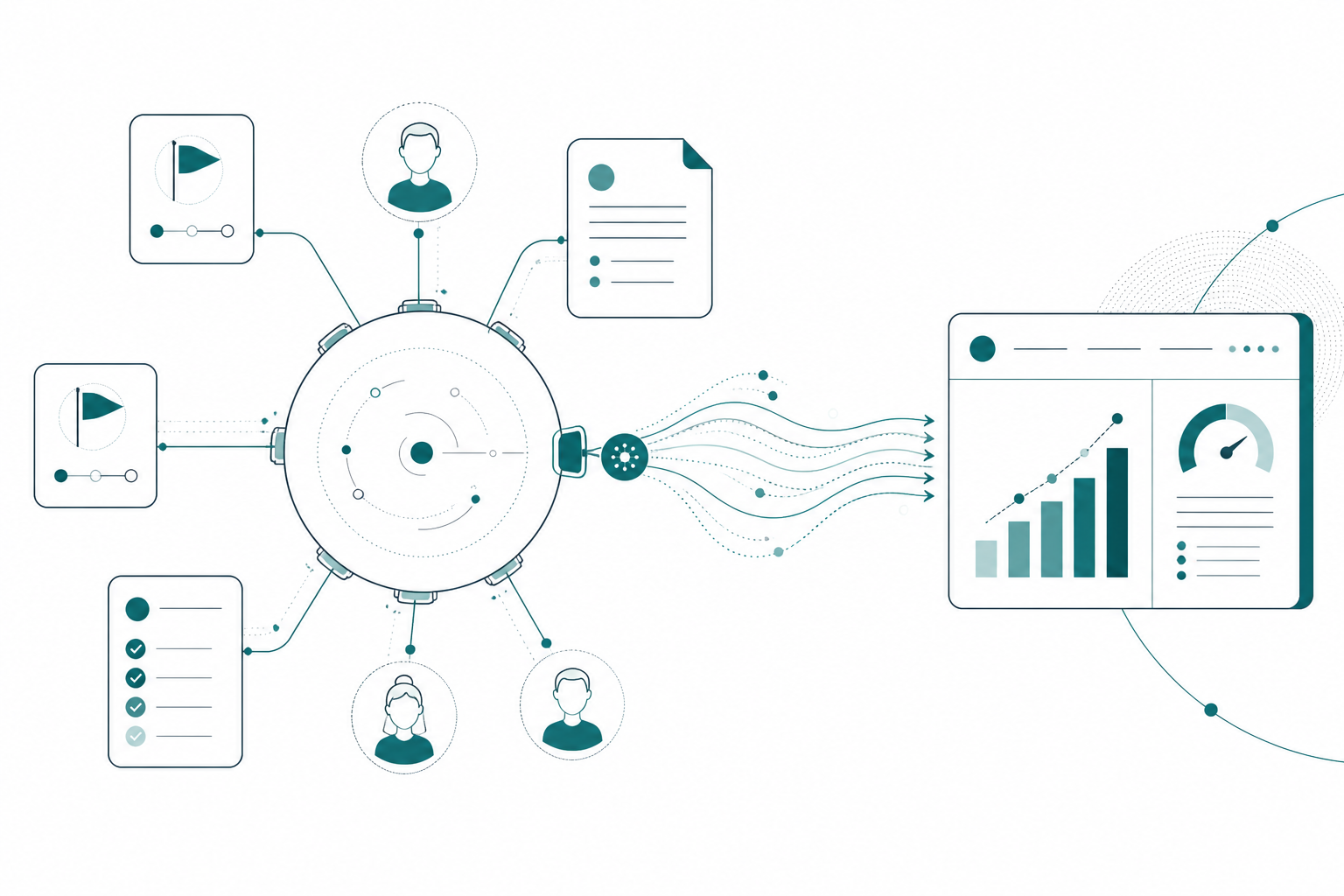
When I wrote Stop Re-Prompting, the idea that got the most questions wasn’t the agents. It wasn’t the MCP servers either. It was the hub. People wanted to see it. What does “the project is the hub” actually look like on the page? What kinds of pages? How do they connect? What does an agent actually read when it walks in the door?
Fair enough. This post is the tour. It’s the organized-context part of the two-harness loop: this one covers the hub, the next introduces my assistants, the agents that keep the whole thing honest, and then the MCP execution session.
So let’s take a project. We’ll call it Northside Baseball, a baseball team with a front office sitting on ticketing data, a CRM, and a books system that don’t talk to each other. The engagement covers a semantic model and Power BI reporting, a Fabric data platform underneath it, and the notebooks that tie it all together. The structure you’re about to see is the structure of every project I run.
The Project Is the Hub, Everything Else Is a Relation
The single most important design decision, the one I whiteboarded before building anything, is that the project page is the center and everything else relates to it. Not folders. Not a pile of notes with good titles. Related records.
And before this sounds like a Notion commercial: the idea is agnostic to the tool. What you’re really deciding is what KINDS of pages a project needs and how they connect to each other. I happen to run this in Notion because it has databases whose pages can relate to one another, and because my agents live there too. The shape would survive a move to another platform. The shape is the asset.
For Northside, the shape is:
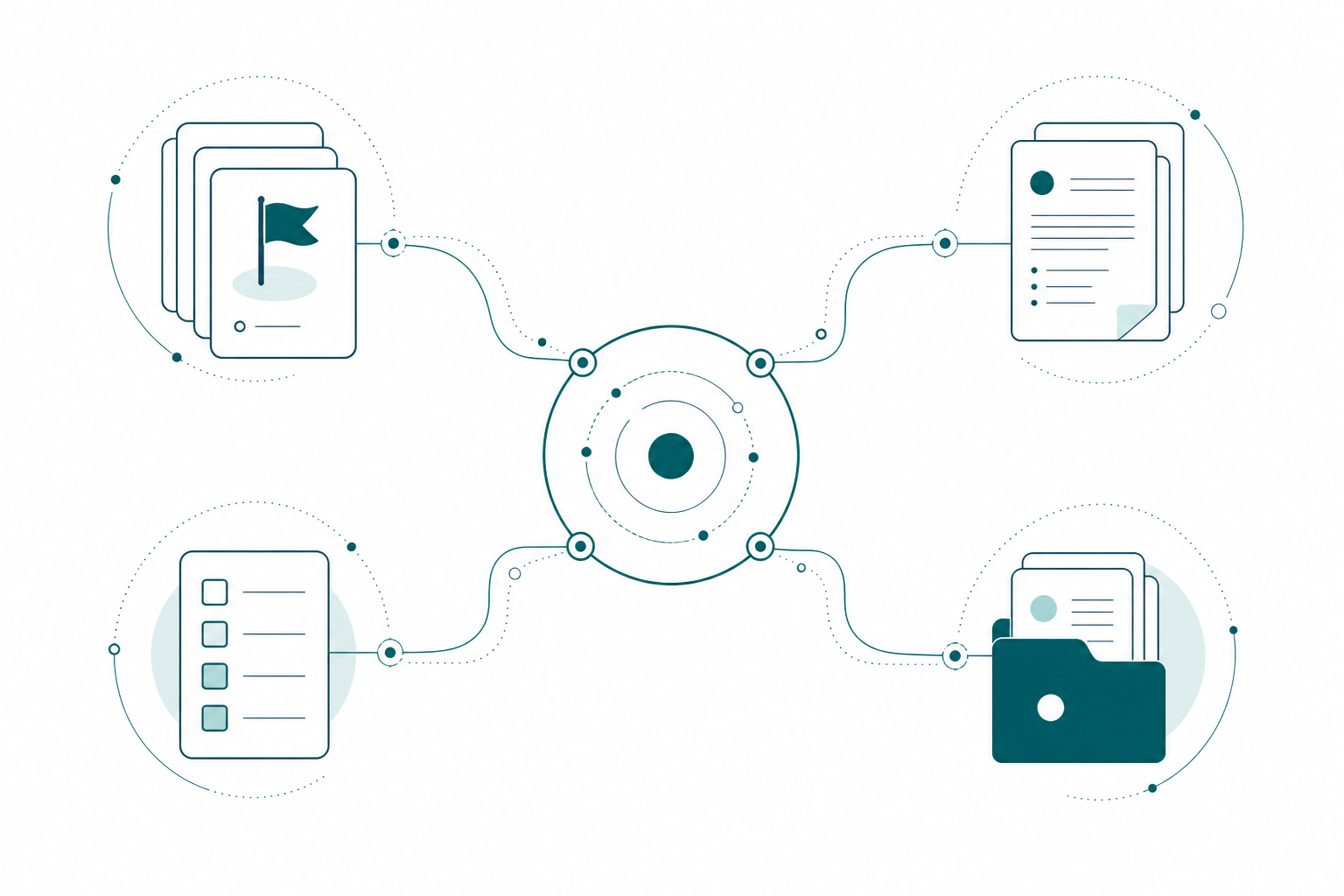
- A projects database. Northside is one page in it, next to every other engagement.
- A milestones database, related to the project: the semantic model and Power BI reporting, the Fabric data platform, the modernization roadmap, the operations P&L, the CRM analytics, the medallion architecture notebooks.
- A meetings database, related to the project. Every meeting note knows which project it belongs to. Automatically. Forever.
- A deliverables database, related to milestones. Each deliverable is a checkbox with a status, not a sentence buried in a doc.
- Time entries, related to deliverables, because hours against scope is a question clients ask and agents can answer.
Could you do all this in a folder of markdown files? You could. I did, for a while. Then I asked my first cross-cutting question and watched the agent flail. Relations are what let an agent reason instead of just search. When I ask “does anything from today’s call block the Ticket Sales dashboard,” the agent doesn’t grep for keywords. It walks the graph: today’s meeting relates to Northside, Northside relates to the semantic model milestone, that milestone owns the dashboard deliverable, and the deliverable has a status. That’s a chain of joins. If you’ve spent your career in star schemas, you already know why joins beat string matching. Your data modeling instincts transfer directly to context engineering. That’s the thesis of this whole post.
What the Hub Page Actually Does
The project page itself has one job: connect the work. It’s where the milestones we’re building toward sit together in one view, so the engagement reads as a whole instead of six disconnected work streams. It’s where the resources live: architecture diagrams, screenshots, the pages describing the semantic model, what’s due and when. When a person or an agent needs to orient, they start here and click outward.
The meetings side is where it earns its keep. Meetings get transcribed and filed against the project, and my agents work through them to keep the picture current. Here’s the practical version. On a Northside call we find out we can’t get access to a column we need from the ticketing system. Nobody writes a ticket. Nobody remembers to follow up. The meeting note relates to the project, the agent reads it, and that access gap shows up on the hub as a blocker, linked back to the conversation where it surfaced. The status update that goes out that week already includes it.
Agents also keep a dated status snapshot and a short list of what to act on next at the top of the page, refreshed on a schedule and after meaningful events. The point isn’t the layout. The point is that the hub is a briefing that stays current whether or not I touched it this week, not a filing cabinet I keep tidy out of discipline. When I open the project Monday morning, or when an agent opens it mid-session, the first screen answers “where are we and what matters right now,” and I didn’t write a word of it.
Every Milestone Page Has the Same Skeleton
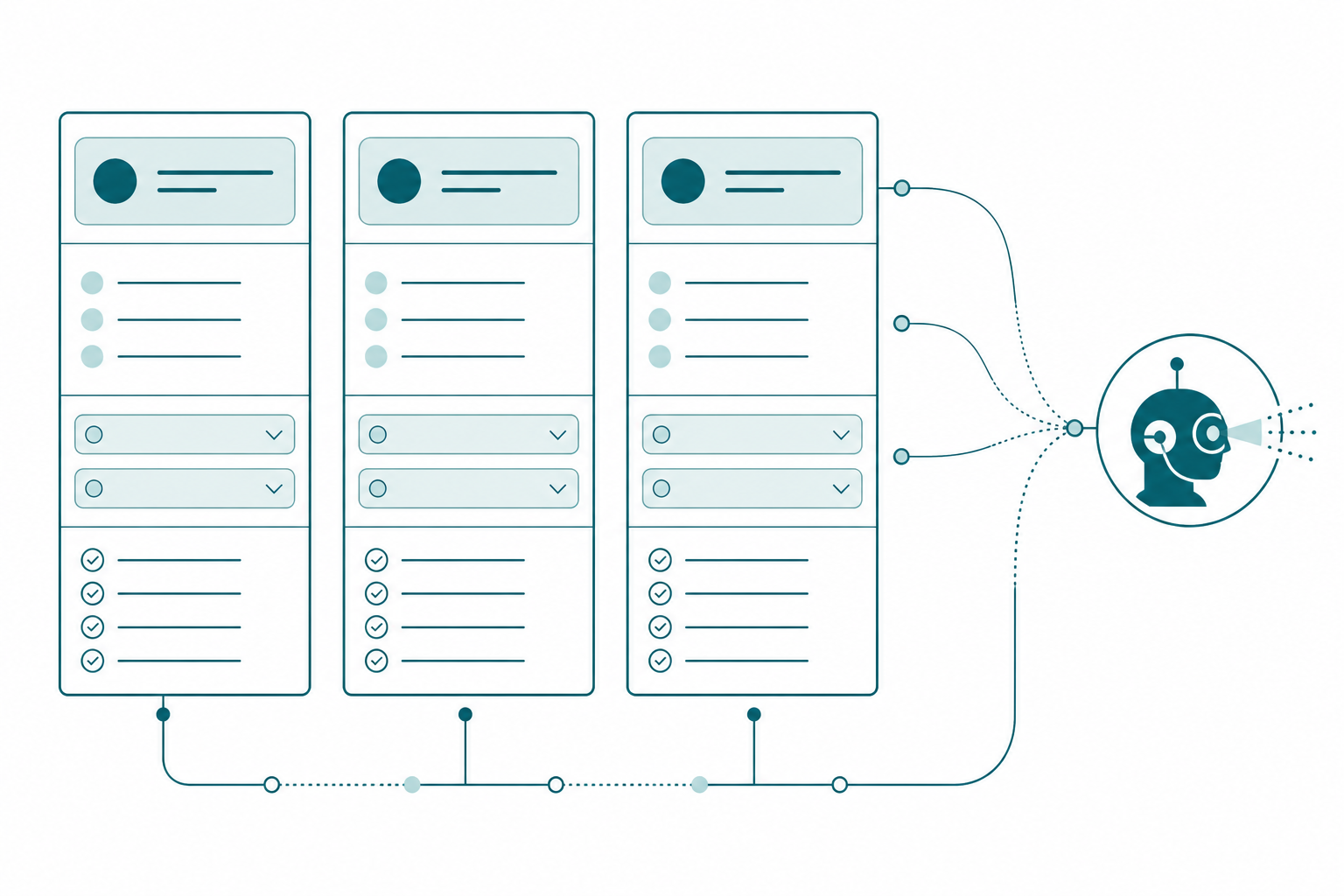
Here’s a detail that took me too long to appreciate: consistency of structure is context engineering. My operations agent built every Northside milestone page with one canonical shape: a status snapshot, next steps scoped to that milestone, the scope as collapsed toggles, a deliverables checklist with real statuses, an overview with a definition of done a client could read, resources, and an automated update log.
Take the medallion architecture milestone, the data engineering backbone of the engagement. Its scope toggles map onto the layers: bronze ingestion from the ticketing system and the CRM, silver cleansing, gold aggregations, the final DirectLake repoint. Its deliverables show which layers are done and which are in flight. Its notes call out the hardest problem in the engagement: matching the season ticket holder keys across the CRM and the ticketing source so both sides agree on who a customer is. And notice what does NOT live on this page: the notebook code. What lives here is the pointer to the instructions pages that govern that work, naming conventions, layer standards, validation rules, so any agent writing a notebook writes it the same way.
Why does the uniform skeleton matter to an agent? For the same reason a scorebook matters in baseball. Any scorekeeper can pick up any scorebook in any ballpark and read it cold, because 6-4-3 means the same thing everywhere. Same idea here. If every milestone page has the same shape, the agent never wonders where the deliverables live or which section is current. It reads position, not prose. An agent parsing seven differently-organized pages burns tokens and makes mistakes. An agent parsing seven identical skeletons is fast and boringly reliable. Boring is what you WANT from infrastructure.
The Hub Writes the Instructions
This is the part that makes everything else in this series possible, and it’s a huge part of why the hub exists at all. For every tool and job on a project, my second brain writes a Claude instructions page, assembled from the hub: milestone scope, deliverable statuses, blockers surfaced in meetings, decisions logged in updates. Here’s a stripped-down slice of the one that runs the Northside semantic model work:
# Claude Agent Instructions: Northside Semantic Model Build

You are a Power BI modeling agent. Build and extend the semantic
model for the Northside Baseball engagement. You have two MCP
servers available: Power BI Modeling and Notion. Use both together.

## 🚨 #1 Priority (only focus until shipped)
Finish the Ticket Sales measure set so sandbox session one with
the ops team can be scheduled. Do NOT touch the season ticket
holder churn work or the concession scoping. Separate sessions.

## 🧠 DAX Autonomy Directive (standing)
The DAX patterns on this page are starting points, not templates.
Use your own expert judgment on function choice and structure.
Document your reasoning in comments wherever you deviate.

## Read before starting
| Page                     | What to look for                    |
| Project hub              | current statuses, open blockers     |
| Semantic model milestone | dashboard scope, deliverables       |
| Data dictionary          | verified table and column names     |
| Latest meeting notes     | anything that moved since this page |

## Report back (required)
Write a recap to the project hub when the session ends: what was
built, validated, flagged, and what's next. A session without a
recap is not done.
Every line of that traces back to a hub page. The priority came from the milestone and the latest ops sync. The do-not-touch list came from scope decisions logged on the hub. The read-first table IS the hub, expressed as a reading order. An instructions page written from a well-related hub scrolls for pages and is accurate. An instructions page written from a folder of notes is a guess. The last part of this series runs a full session off one of these.
The review my assistants run that catches drift between what we said and what we did? It works by comparing the deliverables database against meeting notes and update logs, which is only possible because both sides of that comparison are structured and related.
And the loop closes back here. When an execution session finishes its work, the recap files into the hub, the checkboxes flip, the briefing updates, and tomorrow’s instructions page already knows. The hub is both the source and the destination. That’s what makes it a harness and not a diary.
Build Your Own Hub This Week
You don’t need seven milestones and three agents on day one. You need the shape:
- Create a projects database and make one page per active engagement. Resist making the page a document. It’s a hub.
- Relate a milestones database and a meetings database to it. Two relations. That’s the minimum graph.
- Give milestones a deliverables checklist with real statuses, because “done” needs to be a field an agent can flip, not a vibe.
- Standardize the milestone page layout and apply it everywhere. Same sections, same order, every page.
- Write your first instructions page from the hub. Role, current priority, what not to touch, what to read first, and a report-back requirement. Steal the slice above as the starting shape.
Do that for ONE project and run it for two weeks. The first time you ask an agent a cross-cutting question and it answers by walking your relations instead of asking you to paste context, you’ll feel the difference.
Takeaways
- The project page is the hub; milestones, meetings, deliverables, and time entries connect to it through relations, not folders. The shape is tool-agnostic; I run it in Notion.
- Relations let agents reason with joins instead of searching text, exactly like a star schema beats a flat file.
- The hub’s job is to connect the work: milestones in one view, resources in one place, and meetings that turn into blockers and updates without anyone writing a ticket.
- Identical milestone page skeletons are context engineering; agents read structure faster and more reliably than prose.
- The instructions pages are the payoff: written from the hub, scoped to one job, ending with a required report-back that closes the loop.
Next in this series: meet my assistants, the agents that organize this context, drive the requirements, and keep the hub honest. Then the MCP execution session, where the instructions page my hub writes gets picked up by Claude and turned into real semantic model work over the Power BI Modeling MCP. If this sparked something, keep the conversation going with us on the Explicit Measures podcast, and subscribe at PromptingBI for more.