
The Context Harness and the Execution Harness: Two Harnesses, One Loop
September 25, 2026 · Tommy Puglia
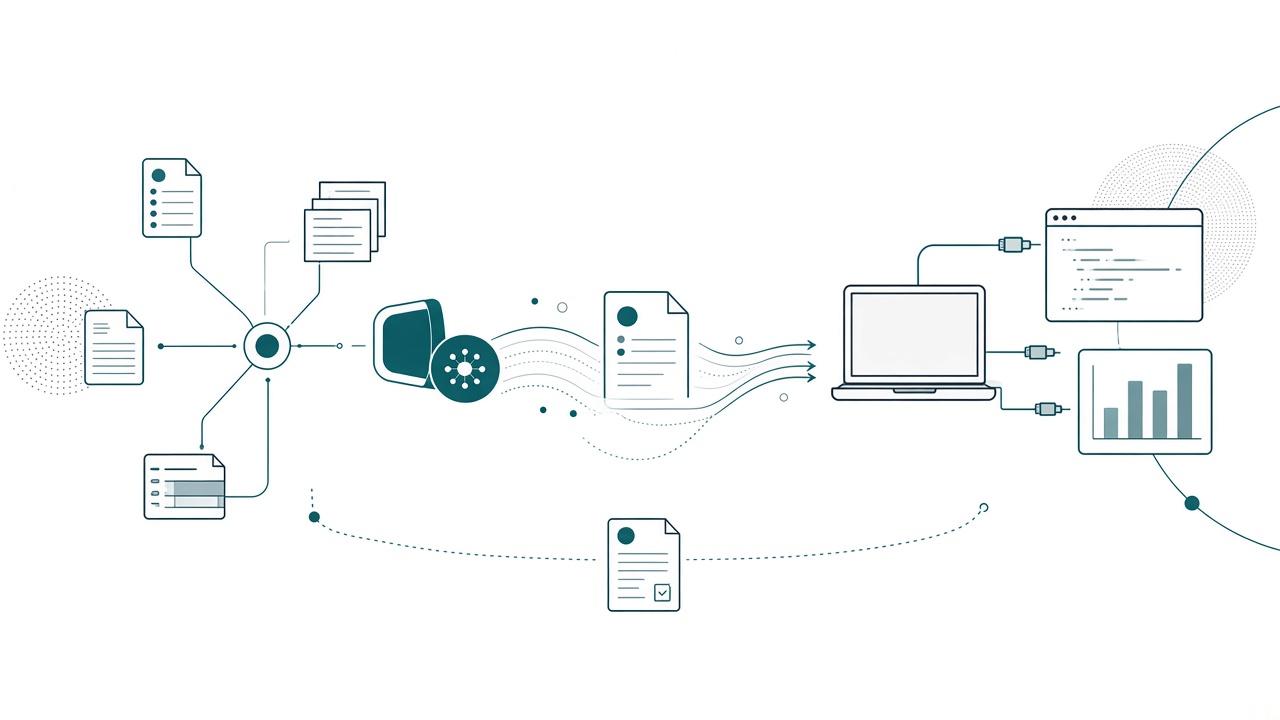
You know the routine. You open a chat, paste the background, and explain the project again. You copy the code out, paste it into a notebook, and hope. The next day the agent has no memory of yesterday, so you do it all over. The answers sound right the whole time, and nothing warns you when they aren’t.
I want a loop, and a loop needs two harnesses. The context harness is where the project’s knowledge lives and gets refined. The execution harness is where the work happens. I’ve written about the pieces one at a time in the Stop Re-Prompting series: the hub, the assistants, and the MCP execution session. This post puts them in one picture. It’s the talk I gave at the Chicago Fabric / Power BI User Group this week, written down, because the pieces only make sense once you see what each harness is FOR.
Here’s a number that surprises people: about 80% of my agentic development time goes into the context harness. The sessions and the prompts share the other 20%.
Model, harness, context
People still argue about models, and the model does matter. But you can swap it, and it can only work with what it’s handed. What sits around the model moves the result more.
I use three terms, and I use them precisely:
- The model: Claude, GPT, whichever one you run.
- A harness: everything around the model. The context it reads, the tools it can call, the rules it follows, and where its work goes when it’s done.
- The context: what the agent reads before it acts. The project hub, the milestones, the standards, its instructions, and the last recap.
Put the same model in a better harness and you get a different result. When someone tells me AI is bad at Fabric, the cause is almost always the context or the harness.
Ask a stakeholder what agentic AI for data means and you’ll usually hear “a chatbot you ask about sales.” (I wrote about where that chatbot belongs in A Data Agent Should Be a Sub-Agent.) The agents I’m talking about build things that stick around: the model, the notebooks, the report pages people open every morning. Both harnesses exist to support that work.
Why I split it in two
Everything around the model counts as the harness. I split it in two because the halves do different jobs and break in different ways.
My context harness is Notion. It holds the project hub and every related database, the milestones (all built on one page skeleton), the instructions pages written from the hub, and the updates log the agents write back to. It gets better every week the project runs.
My execution harness is Claude Desktop and Cowork, plus Cursor. It reads the instructions page first, then surveys, builds, and validates. I can close a session and lose nothing, because nothing important lives in it.
The execution harness reaches Fabric and Power BI through MCP servers. The Notion MCP reads the hub and writes the recap. The Power BI Modeling MCP handles measures, relationships, and DAX. The Fabric MCP reaches workspaces, OneLake, tables, and shortcuts.
Context goes in, work comes out, and the recap goes back in. Every session starts at the hub and reports to the hub.
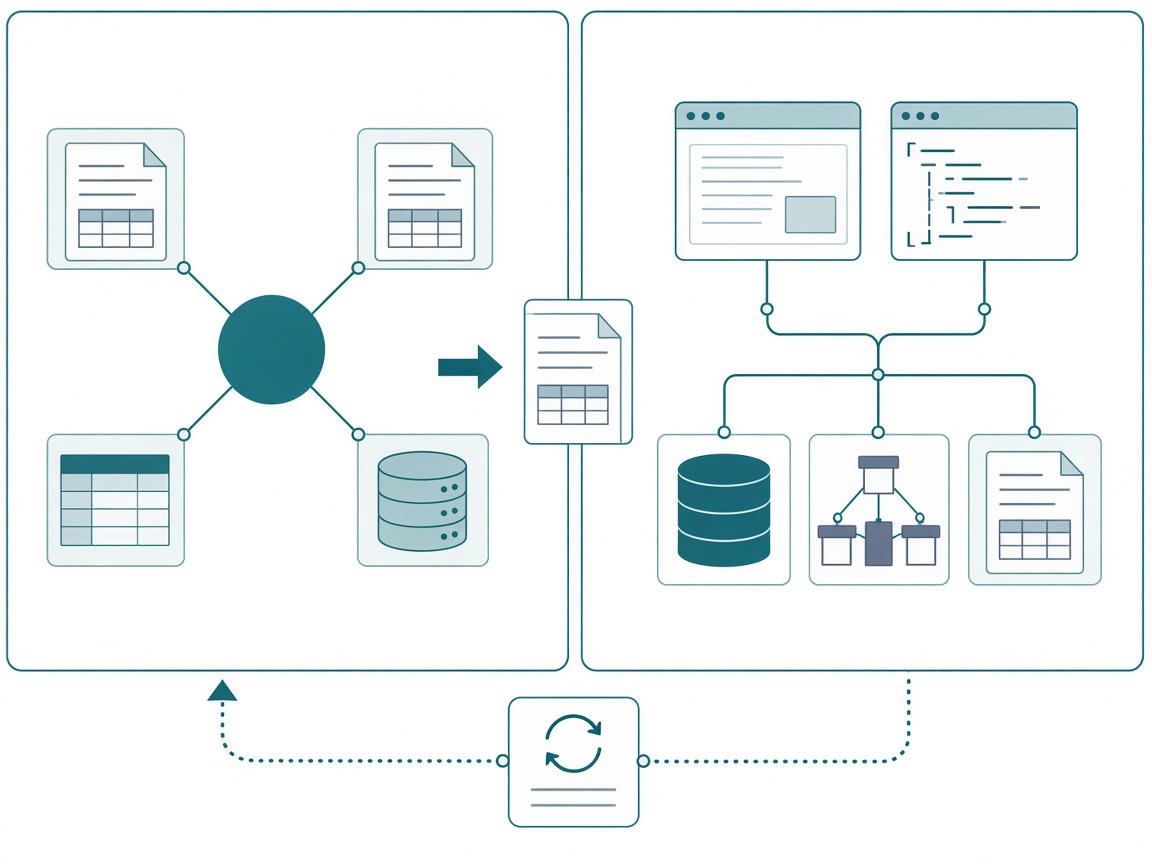
Here’s the payoff. Once the context lives in the hub and out of chat history, it stops mattering which tool ran yesterday’s session. Cowork or Cursor, this model or that one, they all read the same page and write back to the same place. That’s why I can switch tools as fast as this space moves and keep everything the project knows.
Where 80% of my time goes
The closest description I have for this is a recipe. It’s too early for anyone to hand you an install-this-run-that setup. You can get the ingredients right and have them prepped before a session starts, and that prep is the context harness.
The basics are in the series. The project is the hub and everything else is a relation, so an agent can follow the links between pages to find an answer. Every milestone page uses the same skeleton, so the agent always knows where each section is. And the hub writes the instructions: role, #1 priority, do-not-touch list, read-first table, report-back.
The piece I haven’t shown yet is the one that holds a big project together: the master sequence page.
A real project doesn’t have one instructions page. Northside Baseball has dozens, and fifteen new ones were written in a single day this week: API discovery, notebooks, the semantic model build, Desktop Bridge report design, the warehouse path, orchestration. If I have to remember which one is next, I’m the bottleneck again. So my agents keep one page that sequences all the others and tracks where each one stands. Here’s the top of the real one in Notion:
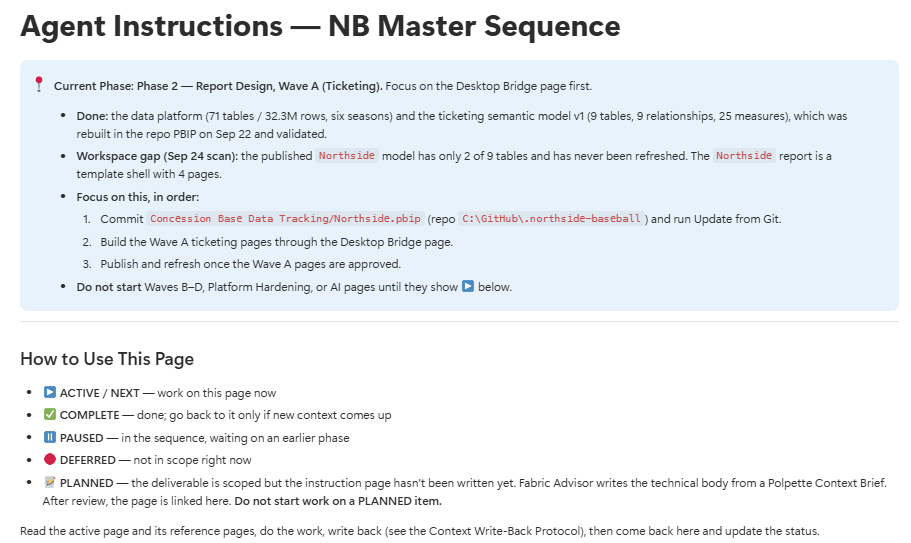
And here’s a trimmed slice of the same page as text, so you can copy the shape:
# 📋 Agent Instructions: Northside Master Sequence

> 📍 Current Phase: Phase 2, Report Design, Wave A (Ticketing).
> Done: the data platform (71 tables, six seasons) and the
> ticketing semantic model v1 (9 tables, 9 relationships,
> 25 measures), rebuilt in the repo PBIP and validated.
> Workspace gap (Sep 24 scan): the published model has only
> 2 of 9 tables and has never been refreshed.
> Focus on this, in order:
> 1. Commit the PBIP and run Update from Git.
> 2. Build the Wave A ticketing pages through the Desktop Bridge page.
> 3. Publish and refresh once the Wave A pages are approved.
> Do not start Waves B through D, Platform Hardening, or AI pages
> until they show ▶️ below.

## How to Use This Page
This is the master sequencing document for every Claude
instruction page on the project. Hand Claude this one page at
the start of a session instead of choosing individual pages.

- ▶️ ACTIVE / NEXT: work on this page now
- ✅ COMPLETE: done; go back only if new context comes up
- ⏸️ PAUSED: in the sequence, waiting on an earlier phase
- 🔴 DEFERRED: not in scope right now
- 📝 PLANNED: scoped, but the instruction page isn't written yet.
  Do not start work on a PLANNED item.

Read the active page and its reference pages, do the work,
write back (see the Context Write-Back Protocol), then come
back here and update the status.

## Instruction Page Sequence
### Phase 0: Discovery & Data Platform ✅
1. ✅ API Discovery: endpoints documented. Closed out Sep 24.
2. ✅ Fabric Notebooks: 8 notebooks, 75 FK checks, zero orphans.
### Phase 1: Semantic Model ▶️
1. ✅ Semantic Model Build: v1 audited. Open audit items carry
   forward to the surrogate key and Direct Lake pages.
2. 📝 Model Publish & Direct Lake Cutover
### Phase 2: Report Design ▶️
1. ▶️ Desktop Bridge Report Design: Wave A runs from this page.
### Phase 3: Platform Hardening & Handover ⏸️
### Phase 4: MCP Integration & AI Tooling 🟡
The Current Phase callout is a dated briefing: what’s done, what’s broken, and what to do in what order. The status legend means the agent never has to guess whether something is in scope. PLANNED is a hard stop, so nobody builds from a page that hasn’t been written and reviewed.
Further down, the sequence itself. Every phase names the earlier engagement it’s patterned on, every item links to its instructions page, and every closed item says when it closed and where the leftover work went:
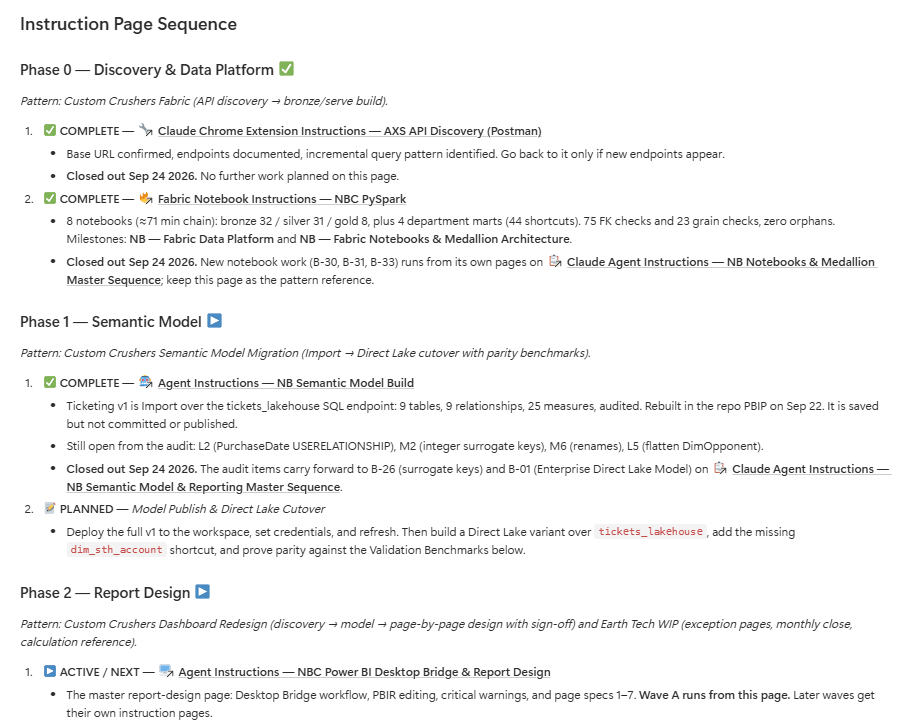
Inside the active phase, the work is split into waves. Wave A runs now. Its last two items are PLANNED, so no session touches them until their pages exist. Wave B is PAUSED until Wave A is approved, and every item in it is scoped down to the tables it will use:
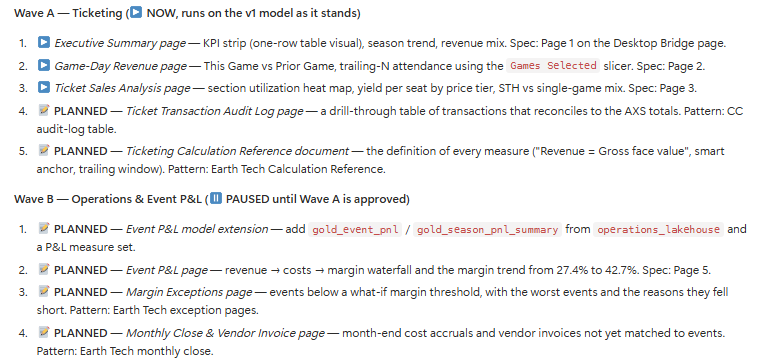
My Fabric advisor agent writes the technical body of each new page from a context brief Polpette puts together, and the page only goes into the sequence after review. That’s my assistants working before a session ever starts, and it’s the same idea as building the thing that creates the thing: I spend my time on the agents that write these pages, not on the pages.
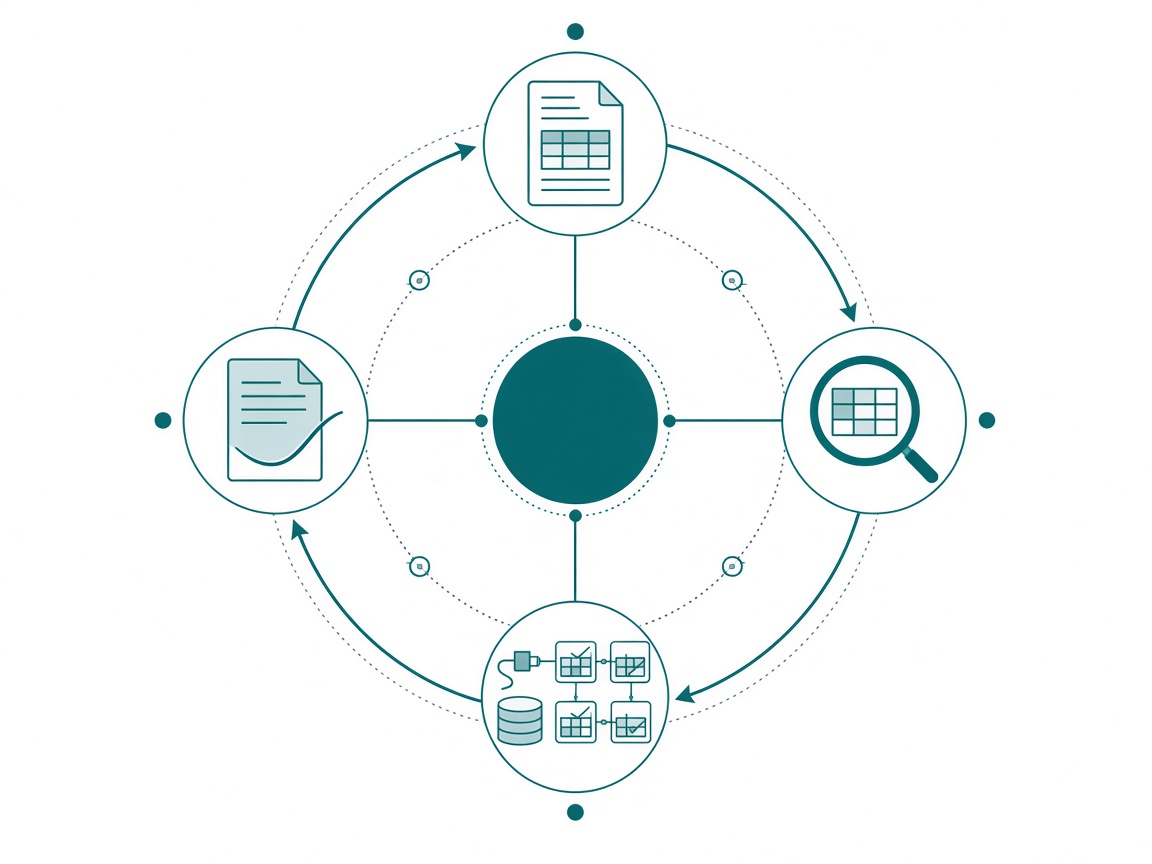
Each instructions page also says where it sits in the chain. This diagram lives on the Desktop Bridge page, so the report agent knows whose output it’s reading and who reads its output:
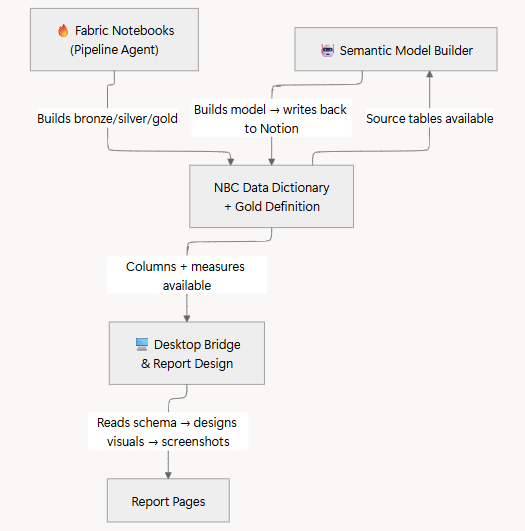
The kickoff comes from the context harness too. By the time I open a session, the instructions were already built somewhere else. Mid-session corrections can be short (“do this one, not that one”), but the first line always points at this page:
Look at the Northside master sequence page in Notion. Let’s make sure we’re on the same page, then start on the active item.
The prompt is short because the hub is long.
The execution harness: two tools and three MCP servers
I run two tools on the execution side and pick by the job.
Claude Desktop and Cowork handle operations. They read the hub through the Notion connector, turn a meeting into a recap, and turn the recap into milestone and status updates. They work with files on my machine, handle long-running tasks, and run scheduled check-ins that keep the hub’s status snapshot current.
Cursor handles the build work. It lives in the repo with the notebooks and the TMDL and PBIP files. MCP servers are configured per project, every change shows up as a diff I can review, and git lets me roll anything back. Its rules point at the same instructions page.
MCP servers let an agent act on the workspace directly, so you stop copying code out of a chat. That’s the power and the risk, so every instructions page lists which servers the session gets and the rule for each one:
## Your MCP Servers
- Notion MCP: read the hub, milestones, instructions, and
  meeting notes; write recaps and flip statuses.
  Rule: read first. Write the recap last. No recap = not done.
- Power BI Modeling MCP: tables, columns, measures,
  relationships; run DAX queries against the model.
  Rule: query to verify before and after every change.
- Fabric MCP: list workspaces, items, OneLake tables and
  shortcuts; create items and pipelines.
  Rule: read-only until the recon report has been reviewed.
I apply two rules from that block everywhere. The instructions page decides which tools a session gets, because that’s part of the job definition. And read tools come before write tools, so every session looks before it touches anything.
Here’s what that looks like on the page the master sequence points at right now, the Desktop Bridge report design instructions. A dated status callout, a one-paragraph role, and exactly three tools:
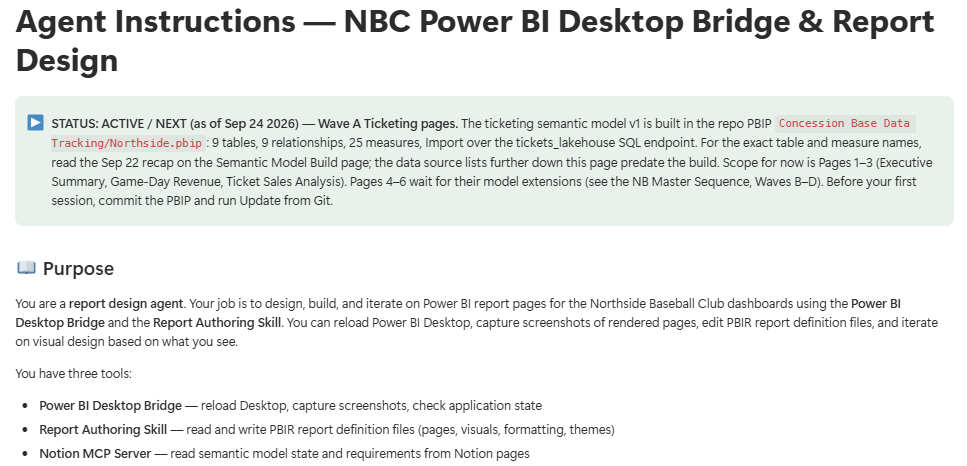
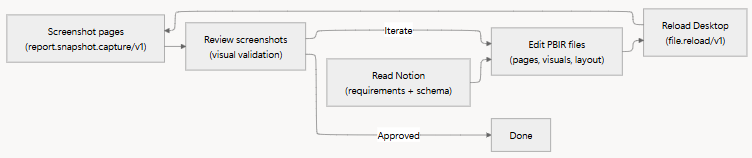
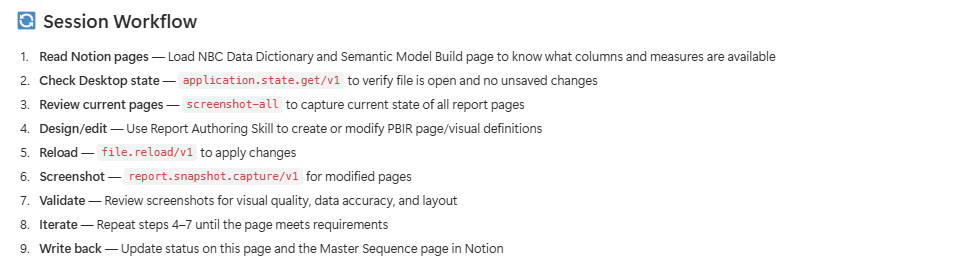
Once the page has done its job, the execute step on report work is its own small loop: read Notion, edit the PBIR files, reload Desktop, screenshot, review, and iterate until it’s approved. (Where the spec for that loop comes from is in Design the Report From the Meeting You Already Had.)
This is also where context compounds. The same page carries a critical-warnings block, lessons learned on earlier engagements, written down so no future session has to learn them the hard way:
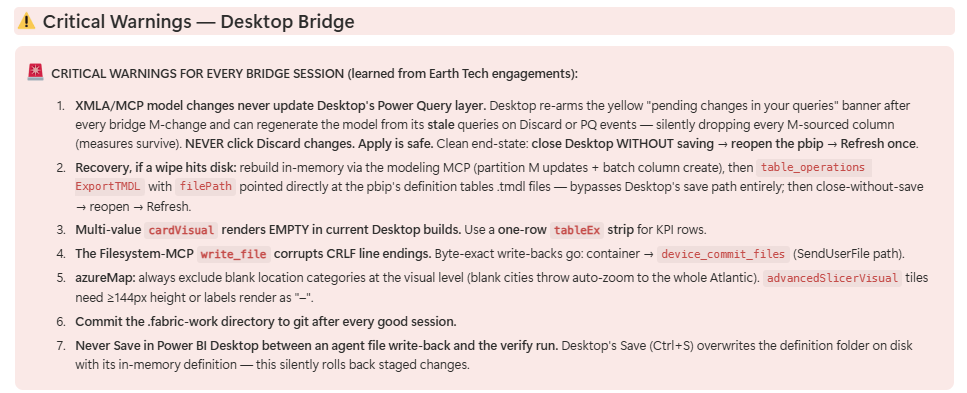
Can you skip the context harness and start prompting Claude Code against a PBIP? Sure, and you’ll get something. If you want real gains, set up the environment first. Canvas speed was never my bottleneck. The visual display is maybe 30% of a good report. The rest is data, evaluation context, and knowing what the page has to answer, and all of that is context.
The loop: instruct, recon, execute, write back
Every session I run goes through these four steps around the hub.
1. Instruct. The hub writes today’s job: role, #1 priority, do-not-touch list, read-first table. The master sequence says which page that is. Nobody typed the priority into a prompt.
2. Recon. Before anything touches Fabric, the agent runs a read-only survey and reports back. I wrote a whole post on why: when an agent writes bad PySpark, you don’t get a red squiggly line, you get data. The recon brief counts physical tables and shortcuts separately (“a shortcut is a pointer”), flags names and descriptions that disagree (“names beat descriptions”), and won’t treat a table’s existence as proof a layer is finished. Look at that Current Phase callout again. The published model had 2 of 9 tables and had never been refreshed. The item was in the workspace, and it was nowhere near done.
3. Execute. The session builds over MCP and has to prove its work. The master sequence carries the numbers every session must hit, each one with the page it came from:
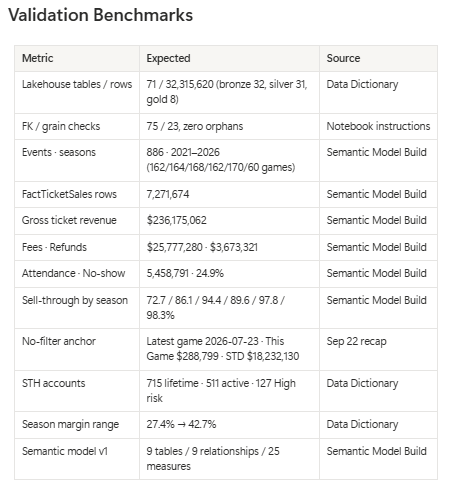
Those expected values were written down BEFORE the build, so “done” means the numbers match. On the notebook side, the same rule is a validation cell the notebook has to pass. No cell, not done. (If you’re wondering who checks all of this, I made that case in Don’t Hire a Senior to QA the Agent.)
4. Write back. The dated recap lands on the hub and the deliverables flip. People skip this step, and it’s the one that makes the next session better. It shows up in two places. Every instructions page ends its session workflow with it:
And the master sequence spells out exactly what “write back” means:
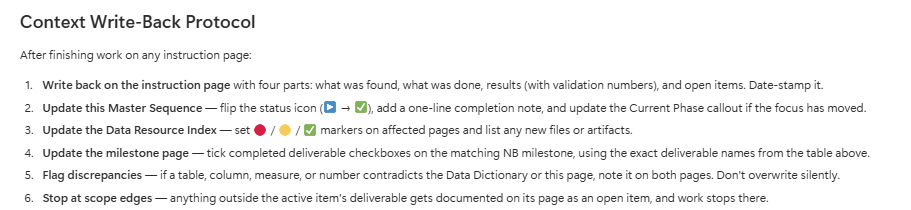
Steps 5 and 6 are my favorites. “Don’t overwrite silently” keeps the context harness honest when the execution harness finds something the docs got wrong. “Stop at scope edges” keeps a session on its one deliverable, so I don’t come back to an afternoon of side work nobody reviewed.
Skip step 4 and step 1 is stale by Friday. The work starts at the hub and reports back to it, and that round trip is the whole design.
When you only build one
I see both of these all the time.
With only a context harness, you get a beautiful Notion workspace. Meeting notes are filed, milestones are tidy, and no agent ever acts on any of it. It’s a very organized diary.
With only an execution harness, you get a great IDE, three MCP servers, and sessions that open with a pasted wall of context that was out of date before you pasted it. It moves fast, in whatever direction the last prompt pointed.
You need both harnesses and the loop between them.
Your first week
You don’t need seven milestones, fifteen instruction pages, and three agents on day one. Pick one project, get the shape right, then grow it.
- One project hub, with relations instead of folders.
- One instructions page with a required report-back. No recap, not done.
- One recon brief. Write it once and reuse it in every tenant.
- One dated verified-state block before the first build. A reference number with no date turns into a trap later.
- One validation cell or benchmark table, so “done” means the numbers match.
When the project outgrows one instructions page (it will), add the master sequence: the current phase callout, the status legend, the sequence, and the write-back protocol. From then on, that’s the page you hand the execution harness.
And only hand the agent more work as fast as your validation can check it.
Takeaways
- The context, tools, rules, and destination around the model decide the outcome more than the model does.
- Keep two harnesses. The context harness improves across sessions. Execution sessions are disposable, and you can swap the tool.
- Expect most of your time to go into the context harness. Mine is about 80%, and that’s where my gains come from.
- On big projects, a master sequence page tracks every instructions page and its status. The kickoff is one line, and PLANNED means don’t start.
- The instructions page decides which tools a session gets, and read tools come before write tools.
- Run every session as instruct, recon, execute, write back. Skip the write-back and tomorrow’s instructions are already stale.
Here’s the question I keep coming back to. If most of the value sits in the context harness, then the context harness is the intellectual property. When I hand a Fabric project to a client, the skills and context I built for that company, plus the validation, are what keep those pipelines running. Does that belong in the handoff? I don’t have a full answer yet, and I think every consultant doing this work will have to find one. My prediction: within a couple of years, the read-only survey will be the SELECT TOP 100 of the agent era, the first thing everyone runs without thinking about it.
Thanks to everyone who came out to the September user group at the MTC. If you’re anywhere near Chicago, next month’s session is all about the Power BI and Fabric MCP servers, the execution side of this post up close. RSVP on the Chicago Fabric / Power BI User Group page. And if this sparked something, keep the conversation going with us on the Explicit Measures podcast, and subscribe at PromptingBI for more.